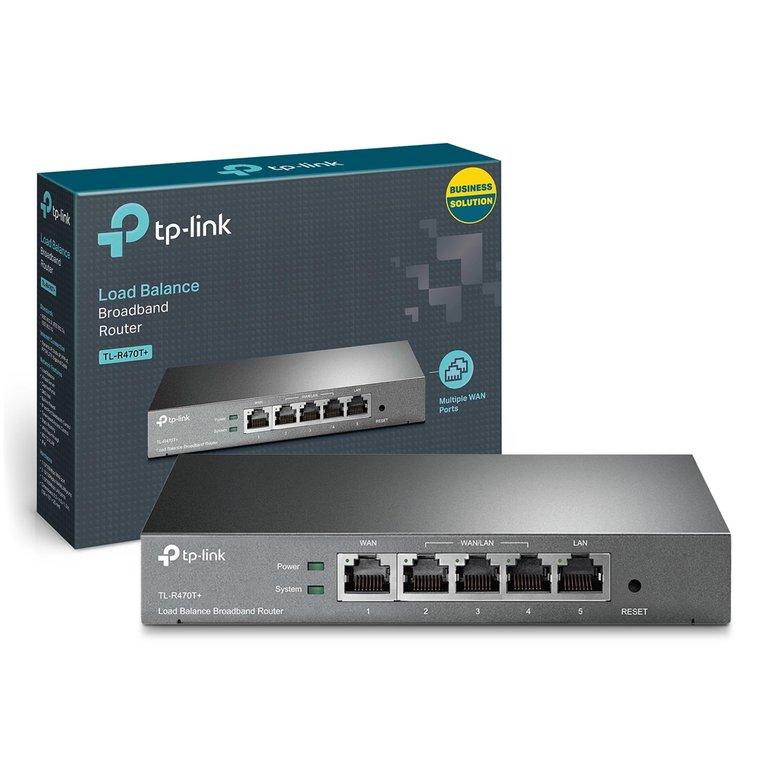
Internet Load Balancer – Multi-ISP Uptime Pack
Keep your internet always on by combining multiple broadband connections into a single, smart gateway. This package uses a TP-Link multi-WAN load balancer router (up to 5 WAN/LAN ports) with full configuration by Installer Guru so that even if one ISP goes down, your work continues without interruption.
Package Overview
- Use Case: Offices, clinics, hospitals, labs and SMEs that depend on internet 24×7
- Hardware: TP-Link multi-WAN load balancer router (multiple WAN/LAN ports)
- Modes Supported: Load balance, round-robin, weighted distribution, failover
- Configuration: Complete setup, testing and basic training by Installer Guru
What’s Included
- TP-Link Multi-WAN Router suitable for your number of ISP links and users
- Router Installation & Integration into your existing network (rack / table mount)
- Configuration of ISP Links:
- PPPoE / static IP / DHCP setup for each ISP
- WAN health check & monitoring where supported
- LAN & Gateway Configuration:
- LAN IP planning, DHCP configuration and DNS settings
- Gateway and routing configuration for internal users
- Policy Design & Setup:
- Load balancing across multiple ISPs
- Failover from primary ISP to backup ISP(s)
- Optional weighted distribution (e.g. 70% / 30%) where supported
- Basic Firewall & Security Hardening on the router
- Testing & Validation:
- Simulated ISP failure test
- Browsing / application tests from client systems
- Handover & Basic Training for your IT/admin team:
- How to check which ISP is active
- Simple steps if internet feels slow or unstable
- How to safely reboot or report an issue
- Configuration Summary / Documentation with key details and logins
How It Works
We place the TP-Link multi-WAN router between your existing ISP modems and your internal network. Multiple broadband lines are connected to the WAN ports, and your switches / Wi-Fi routers connect to the LAN side of the device.
- Load Balance Mode: Traffic is distributed across multiple ISPs to improve overall stability.
- Failover Mode: One link is primary; if it goes down, traffic automatically shifts to backup links.
- Round Robin / Weighted Mode: Traffic can be shared based on defined ratios (where supported).
This ensures that your critical applications — HIS, ERP, cloud software, email, teleconsultation and more — remain reachable even if one internet provider has downtime.
Ideal For
- Hospitals & diagnostic centres that must remain online 24×7
- SME offices using cloud-based ERP, billing or CRM
- Branches where internet downtime directly affects revenue or patient care
- Trading desks, call centres and customer support teams
- Any setup running mission-critical services on the internet
Scope of Work
- Review of existing network layout and ISP connections
- Recommendation of suitable TP-Link load balancer model
- Physical installation / integration of the router
- Configuration of all available ISP links on WAN ports
- LAN, DHCP, gateway and DNS configuration
- Setup of load balancing, failover or mixed policy as per requirement
- Testing with real user traffic and ISP failure simulation
- Basic documentation and handover to your team
Requirements from Customer
- Active broadband / leased line connections with modems/ONTs available near the router location
- Power and physical space for the router (rack or shelf)
- Access to existing network devices (switches, Wi-Fi access points, firewalls if any)
- Administrative credentials for ISP modems or relevant details (PPPoE usernames, static IPs, etc.)
- A nominated IT or admin person for basic training and future coordination
What is not included by default
- New structured cabling or electrical wiring
- Redesign of complete network architecture or advanced VLAN segmentation
- Complex VPN / site-to-site tunnels or SD-WAN designs
- Continuous monitoring, SLA-based support or AMC (can be offered as an add-on)
- Any additional network hardware beyond the planned router (switches, Wi-Fi APs, UPS, racks, etc.)